
The independent data control layer
Control your data before your tools do.
LyftData gives you one place to collect, transform, govern and route data before it reaches your security, observability, analytics, storage or AI platforms.
Reduce downstream spend. Keep your tools replaceable. Apply policy once across the stack.
- Enterprise-ready deployments
- Cloud · Private · On-prem · Edge
- Built for high-volume data movement
Your tools should consume your data. They shouldn't define your data architecture.
As the stack grows, so do the collectors, transformations and policies around it. Every new destination can become another pipeline to build, operate and eventually migrate.
Illustrative architecture
Three views of the same architecture. Without a control layer, each of three sources — cloud and apps, security tools and databases — runs its own pipeline to each of three tools: a SIEM, observability and a warehouse. That is nine pipelines, with policy declared in each one. With LyftData, each source is collected once into the LyftData control layer, policy is applied there once, and data is routed on to each tool. Replacing a destination, such as the SIEM, changes only the final hop from LyftData; collection, transformation and policy stay the same.
Without a control layer, every source runs its own pipeline to every tool. That's nine pipelines to build and keep in sync, and policy declared in nine places.
Stop sending every byte to the most expensive place it can go.
Different data has different value. Filter, deduplicate, transform and route it before downstream platforms meter the volume.
Illustrative example
Without a control layer
~10 TB / day generated
- Everything → premium path— metered and indexed at premium rates
With LyftData
~10 TB / day, routed
- High-value → SIEM— the slice worth premium pricing
- Shaped → observability— trimmed, deduplicated telemetry
- Full fidelity → data lake— everything, in a low-cost store
An illustrative example. Without a control layer, roughly 10 TB/day of generated data all follows the premium path into a SIEM. With LyftData in front, the same 10 TB/day is split by value: a thin high-value slice goes to the SIEM, a shaped and deduplicated subset goes to observability, and full fidelity is kept in a low-cost data lake.
Control happens here.
Build, operate and observe data workflows from one platform.
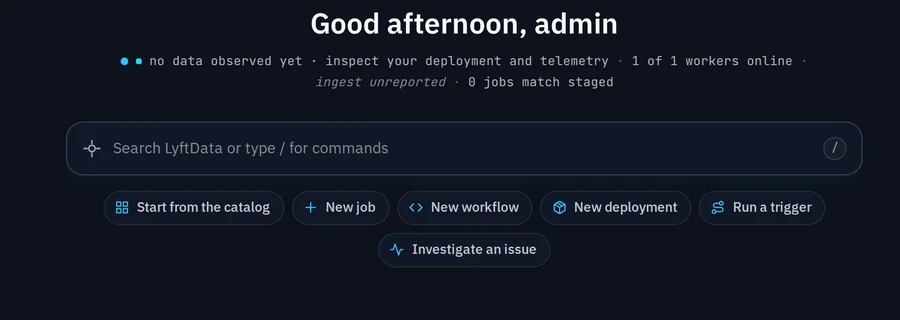
The Home screen opens on data state and the actions that operate it — for people and for agents.
- Data-state status line
- Command bar
- Agent-facing actions
Data infrastructure your agents can operate.
LyftData brings agents into the same governed control layer used to operate your data infrastructure.
The control layer stays the control layer. Agents become another interface to it — alongside the product UI and the API.
- The same control layer, whether the operator is a person or an agent
- Available actions depend on the tools and permissions you configure
- Agents are an interface to the platform, not a way around it
MCP is included in every edition. AI features such as Ask about my data, Data Awareness and the Operations Agent need a licensed edition (Community+ or above) and an AI provider; Data Awareness and the Operator are Preview in 3.0.
See how LyftData fits AI workloads →One control layer · three interfaces
LYFTDATA
Governed operations · one policy set
- Collect
- Transform
- Route
- Govern
- Observe
→ Which jobs are running right now, and on which Worker?
← Reading the control layer through MCP — returning the running jobs and their Workers.
Available actions depend on configured tools and permissions.
Run the control layer where the data lives.
Keep execution close to the source while managing the data layer centrally.
LYFTDATA
Server · central control plane
- Workflows
- Policy
- Scheduling
- Visibility
Worker
Cloud
in-region, next to managed services
Worker
Private · VPC
inside your own network boundary
Worker
On-prem
in your data center
Worker
Edge
close to where data is produced
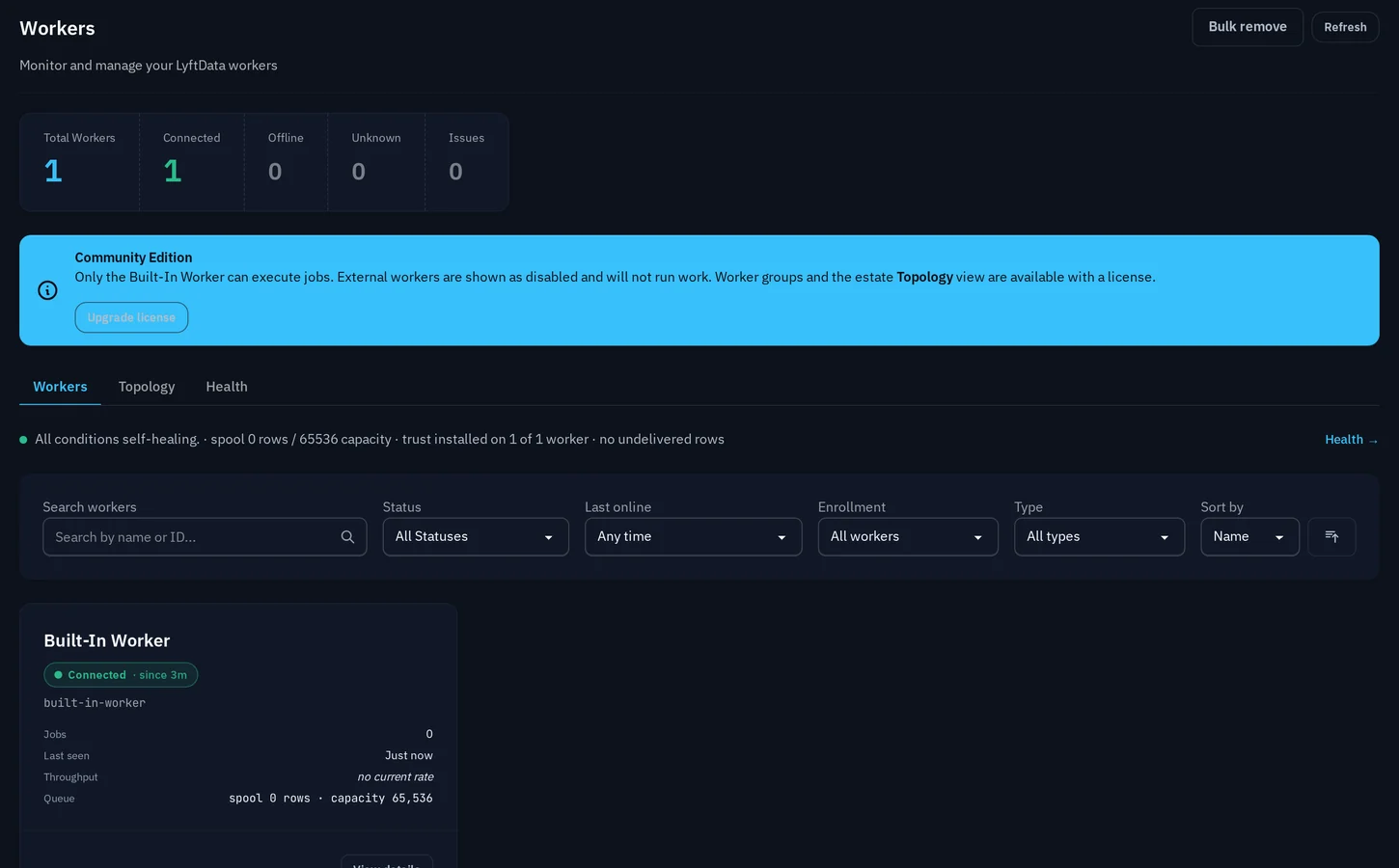
The Workers and Server Status views are where distributed execution is actually monitored.
See how LyftData deploys →Start with the problem you need to solve.
Solution 01 / 05
Control downstream cost
Reduce the volume and processing consumed by premium platforms.
View this solution →- Control downstream costReduce the volume and processing consumed by premium platforms.
- Modernize security & SIEMSeparate security data movement from the SIEM itself.
- Simplify observabilityShape logs, metrics and traces before they reach downstream tools.
- Build reusable data infrastructureApply transformation, governance and routing once across the stack.
- Prepare for AI & agentsPut governed data and infrastructure context behind AI workloads.
Your stack stays yours.
Connect the systems creating your data to the platforms that need it — without turning any one destination into the center of your architecture.
Technologies it works with
- Splunk
- Microsoft Sentinel
- Datadog
- Elastic
- Snowflake
- Amazon S3
- Google Cloud Storage
- Apache Kafka
Integration and compatibility references — not customer or partner endorsements.
LYFTDATA
Open by design
- Collect
- Govern
- Route
Destinations
Route governed data to the platforms that need it.
Partners
Technology, solution and reseller partners build with LyftData underneath.
OEM · embedded
Put the control layer inside your own product.
- Versioned workflows, explicit rollback
- Central control, distributed execution
- Observable end to end
- Runs on infrastructure you control
Take control of your data layer.
Start with LyftData, or show us the architecture you want to simplify.